
AI Workflows for Businesses: How to Systemize Operations Without Adding More Busywork

Most businesses don’t have a tool problem. They have a systems problem. Leads come in from the website, email, social, ads, referrals, and the phone. Follow-ups live in someone’s inbox. Customer details get copied by hand from one platform to another. Reports get built manually every week. Tasks get created after someone remembers to create them. The business keeps moving, but too much of that movement depends on one person remembering every step. That’s where AI workflows help. Not because AI is magic, and not because every business needs another platform bolted on. AI workflows are useful when they turn a process you repeat every week into something reliable that doesn’t depend on memory. The problem isn’t a lack of AI. It’s a lack of systems. Most businesses already run plenty of software. A website, a CRM, email marketing, a calendar tool, project management, accounting, analytics, maybe some industry-specific platform on top of all that. The problem is those tools don’t talk to each other. A form gets submitted but never creates a CRM record. A sales call happens but no follow-up task gets assigned. A customer approves a project but someone still has to build the onboarding checklist by hand. A manager wants a weekly snapshot but the numbers live in five different places. That’s operational drag. People spend their time moving information around instead of using it. AI workflows fix that by connecting the steps that already happen inside your business, so the process repeats itself correctly without someone babysitting it. What an AI workflow actually is It’s a repeatable process that uses automation, integrations, business rules, and AI to move work from one step to the next. A lead fills out a form. The workflow captures it, has AI summarize what the lead needs, checks it against your criteria (service type, budget, location, urgency), creates the CRM record, assigns a task, drafts a first response, and schedules the follow-up. Your team gets an alert instead of a raw form submission sitting in an inbox. The human is still making the decisions. They’re just not the one manually stitching every step together anymore. Every workflow worth building has the same five pieces: That last one matters most. Good AI workflows don’t remove judgment. They remove the busywork sitting around it. Where this actually pays off Start with the process you repeat most, not the one that sounds most impressive. Lead intake. Someone reads every inquiry, decides if it’s a fit, adds it to the CRM, routes it, and writes a reply. An AI workflow can summarize the inquiry, classify it, tag the service interest, check basic qualification, route it to the right person, and draft the first response for a human to approve. Faster follow-up, and it’s consistent every time instead of depending on who happened to see it first. Sales follow-up. This is where revenue quietly leaks out of most businesses. Interested lead, no follow-up scheduled. Proposal sent, no reminder set. Question asked, answer buried in an inbox somewhere. A workflow can build the follow-up task, draft the check-in email, and flag anything sitting too long in the pipeline. The message still goes out as a draft for a human to send, not blind. Customer onboarding. The first few days after someone says yes set the tone for the whole relationship, and it’s also where a lot of businesses create friction they don’t need to. Folders, intake forms, internal tasks, kickoff scheduling, missing-asset tracking, all of it can trigger automatically the moment a deal closes instead of waiting on someone to remember to start it. Support and reporting. Support requests can get summarized, classified, and routed on arrival, with recurring issues surfaced instead of buried. Reporting works the same way: pull from the systems you already run and turn it into one operating summary, new leads, source performance, open proposals, overdue follow-ups, instead of a dashboard nobody remembers to check. Where n8n, Dify, and Zapier actually fit The tool isn’t the strategy, the workflow is. But once you know what you’re building, the tool choice gets easy. Zapier is the right call for straightforward app-to-app automation where speed matters more than complexity. n8n is what we reach for when a workflow needs branching logic, custom API steps, or real control over how data moves. It’s our default for anything with more than two or three decision points. Dify earns its spot when the workflow needs an AI-powered assistant, chatbot, or agent doing more than routing, an actual structured LLM interaction. Most systems we build end up using more than one. A CRM owns the customer record, n8n connects the systems, AI drafts and summarizes, and a project management tool tracks the work. That’s normal. The point isn’t to pick a winner, it’s to design the workflow first and let the tools fill in around it. What not to automate Don’t automate a broken process. If the steps are unclear today, automation just makes the confusion move faster. Don’t let AI make high-trust decisions without a human checking it first. Pricing, contracts, sensitive customer communication, legal language, anything public-facing, that all needs a person in the loop. Don’t build a workflow with no owner. Someone has to be responsible for watching it, fixing it when a tool changes something, and improving it over time. Automation left unattended breaks quietly and nobody notices until a customer does. How we actually approach this We work across home services, manufacturing, and ecommerce, and the tools change client to client, n8n as the connector layer, ClickUp or HubSpot as the CRM and project layer, QuickBooks for the financial side. But the questions we start with don’t change: Where is the business losing time? Where are leads or customers falling through the cracks? Which repeated tasks are slowing the team down? What does leadership need to see that they’re not currently getting? Which steps genuinely need a human, and which ones are just busywork wearing a human’s name? From there it’s mapping
I Was the Bottleneck in My Own Business. Goldman Sachs 10,000 Small Businesses Fixed That.

I found the Goldman Sachs 10,000 Small Businesses program the way I find most things lately: scrolling LinkedIn. I’d never heard of it. It was free, I couldn’t spot a catch, and I figured I had nothing to lose. So I opened the books, went through the interview process, and applied. A few weeks later I got into the Minnesota #2 cohort. And the program taught me its first lesson before a single class started. The bottleneck was me When I got in, they told me to plan for 15 to 20 hours a week. We’d meet in person to open and close the program at St. Cloud Technical College, with twelve weeks of work in between: financial audits, marketing, hiring, negotiations. The management fundamentals most of us never sit down and formally learn. There was a problem with committing 15 to 20 hours a week. At the time, I was Eclipse Digital. I managed the clients. I ran sales. I scoped the projects, then did the development too. I’d just hired Andrea as our Client Relations Specialist and started building out SOPs so I could pull back from the day-to-day, but we hadn’t actually figured out our processes yet, never mind written them down. I was trying to run all of it. Somewhere along the way I’d quietly become the thing slowing my own company down. So before the program could teach me anything in a classroom, it forced the decision I’d been dodging. I had to hand off the work. I started giving client tasks to my team. I tried being out of the office for three and four days at a stretch. The business didn’t fall apart. My team handled it. Andrea was new to Eclipse and new to digital marketing, and she stepped up to manage clients and the team while I was in class. Being new turned out to be an asset. She could see the gaps in how we onboard and train people because she was living them. I learned I didn’t need a finger on the pulse every minute of every day. I should have done it years earlier, and the program basically did it for me. That alone would have been worth applying. A room full of people solving different problems There were about 40 of us in the cohort, and the range of businesses was something. Ben runs a residential electrical business. Zach roasts coffee up in Duluth. Michelle owns a social media marketing company. Nicole runs an ice cream shop in Minneapolis. And then there was Roberta, who started a Dungeon Master and game-facilitation business out of almost nothing and grew it into physical locations and serious revenue. I could have listened to her talk about it all day. We were all at different stages, in different industries, and that was the design. I came in hoping to systematize our operations. I didn’t expect how much I’d get out of the people. Comparing notes with the other digital marketers was useful, sure. But sitting across from an electrician, a coffee roaster, and an ice cream shop owner made me look at corners of my own business I’d been ignoring. Everyone was wrestling with a different problem, and somehow that sharpened mine. It also plugged me into a network of business owners all over Minnesota. Possible mentors, collaborators, clients. That network has quietly become the piece that keeps paying off long after the fact. Building the five-year plan (and the night before the presentation) You can’t graduate without two things: a finished five-year business plan, and a presentation of that plan to your cohort. Building the plan makes you actually look at your finances. You open the books, sit with the real numbers, and then forecast what your revenue could be if you made the changes you’re planning. Having a hunch about where your business is headed is easy. Putting it on a slide with numbers attached is a different feeling entirely. The presentation taught me something I wasn’t looking for. Going into the final week I wasn’t worried at all. In my head I was ready. Then we got to the last meetup, I started hearing everyone else walk through their plans, and all of a sudden mine felt thin by comparison. That night I was nervous. I ended up rewriting my slides and writing a longer speech. What actually got me wasn’t the speech. It was the Q&A afterward, which nobody warned me about. I handled it fine. But it was a good lesson in founder psychology. Confidence on its own is fragile, comparison will always find you, and the work you do in response to that nervous energy usually turns out to be worth it. What’s actually changed since The most durable thing I walked away with is the network. I still talk to plenty of people from our cohort, and I’ve since connected with folks from the first Minnesota cohort and the national one. Those relationships have led to real leads and genuine introductions into industries I’d never have reached on my own. The classes end. The network doesn’t. Inside Eclipse, the shift that started in week one held. I stopped being the single point of failure for every client and every project. Andrea now runs Client Relations and carries a chunk of the day-to-day I used to hold onto myself, which freed me up to focus on the work only I can do: sales and business development. We kept building out the SOPs I started during the program instead of letting them die on a shared drive somewhere, and that groundwork is still paying off. That shift hasn’t stopped. We’re in the middle of moving Eclipse from one-off project work toward a retainer model, and that only works if the team can run client relationships without me in the room. We’re also building out AI-driven workflows to take on more of the repeatable marketing work that used to eat a person’s whole week. None of
How We Built a Custom Website for Elite Aircraft Services

Some businesses get built entirely on reputation. No ads, no social media, no website just decades of great work, word-of-mouth referrals, and a client base that knows exactly who to call. Elite Aircraft Services is that business. For a long time, that was enough. But the reality is, not having a website is starting to cost businesses like this real money. When someone searches for aircraft maintenance services and you don’t show up, they find someone else. That’s the problem Elite Aircraft Services came to us to fix. Who Is Elite Aircraft Services? Elite Aircraft Services is a full-service aircraft maintenance and repair shop. Their team, most with over 20 years at the company, handles everything from governor overhauls and avionics inspections to dynamic balancing, airworthiness directive compliance, and precision component assembly. Everything is done in-house. No subcontractors. No shortcuts. They also offer fly-in service, so aircraft owners don’t have to jump through hoops to get their plane worked on. Their whole approach comes down to one thing: get you back in the air as quickly and safely as possible. That kind of shop deserves to be found online. The Challenge: Great Reputation, Zero Digital Presence When Elite Aircraft Services reached out to us, they had no website and no digital footprint at all. For a business in a high-trust, safety-critical industry, that was becoming a real problem. Pilots searching for maintenance services couldn’t find them. New customers moving into the area had no way to discover them. Job seekers had nowhere to look. And there was nothing to hand someone at the end of a conversation no URL, no place to point people for more information. They’d built an incredible reputation over decades. The problem was it only lived in the heads of the people who already knew them. Our job was simple: build an online presence that actually matched the quality of work happening inside that hangar. Our Solution: A Custom WordPress Website We built Elite Aircraft Services a custom WordPress website from scratch. The site is clean, focused, and built around what matters most to their customers: confidence. From the headline “Fly with Confidence” to the service pages, everything is designed to answer the questions a prospective customer would have before picking up the phone. Here’s what we built into it: Service pages that explain each specialty clearly avionics, dynamic balancing, airworthiness directive compliance, and more in language that respects a knowledgeable aviation audience. An About Us section that leads with the team’s depth of experience and makes the in-house, no-subcontractor model front and center. A Careers page so the site does double duty attracting talent, not just customers. Fly-in service visibility so a key differentiator isn’t buried somewhere on page three. A simple contact form and clear contact info so it’s easy to reach out the second someone is ready to talk. The site now works for them around the clock while the team stays focused on what they do best. Check it out at eliteaircraftsvc.com. The Result: An Online Presence Worth Having Elite Aircraft Services now has a website that reflects the quality of the work they’ve been doing for decades. People can find them. Referrals have somewhere to land. Career opportunities are visible. And they have a real digital foundation to build on going forward. That’s what a good website launch should do. It doesn’t reinvent your business it makes sure people can actually find it. Sound Familiar? If you’ve built your business the hard way — through years of good work and loyal customers but your online presence doesn’t show it, we’d love to help. Eclipse Digital builds custom websites and digital marketing strategies for businesses that are ready to grow. We take the time to understand what makes you different and build something that actually communicates it. Let’s talk.
Taking the Mat Online: How We Rebuilt STMA Youth Wrestling’s Digital Home
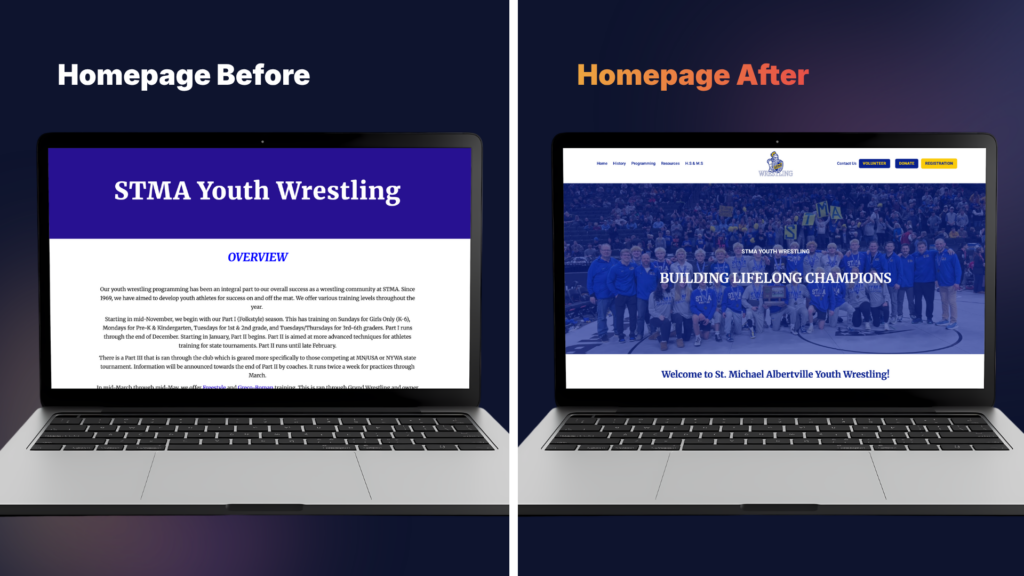
When STMA Youth Wrestling came to us, they had a website that didn’t quite match the grit, pride, and history behind their program. Built on Google Sites, the existing platform was functional but just barely. It couldn’t keep up with the growing needs of a thriving youth athletic organization, and it certainly wasn’t doing justice to a team with a championship legacy worth celebrating. So, we got to work. The Challenge: A Site That Couldn’t Keep Up Google Sites is a great starting point for organizations that need to get online fast. However, as programs grow, so do their needs and STMA Youth Wrestling had officially outgrown theirs. The existing site lacked the visual polish to represent the program well, the flexibility to handle complex functionality, and the tools to streamline communication with families, volunteers, and supporters. The team came to us with a clear vision: they wanted a site that felt as strong as their athletes. They needed a platform that told their story, honored their history, and made it easy for the community to get involved whether that meant signing up a wrestler, making a donation, or volunteering their time. The Solution: A WordPress Rebuild, Built for a Champion We chose WordPress as the new platform, and for good reason. WordPress gave us the flexibility to build a fully custom experience while keeping the backend manageable for the STMA team to maintain. With a robust ecosystem of plugins and a proven content management system, it was the perfect engine for a project of this scope. Looking for Long-Term Digital Support? While WordPress is highly user-friendly, many organizations prefer to leave the technical heavy lifting to the experts. To help growing teams focus on what they do best, we offer monthly maintenance and security packages, alongside blocked hours for ongoing development and content creation. A Design That Represents the Program The first priority was creating something STMA Youth Wrestling could be proud of. We designed the site with the organization’s identity front and center: hard work, family, and building lifelong champions . The goal was for any visitor whether a first-time parent or a longtime supporter to land on the page and immediately understand what this program is about: building confidence, discipline, and lifelong friendships. We also built out dedicated sections to showcase their history of championships, because that legacy deserves the spotlight. Titles, milestones, and the athletes who earned them are now featured prominently, giving the program the recognition it has worked so hard to achieve. Built for Mobile-First Families Youth sports parents are rarely sitting at a desktop computer when checking tournament schedules or volunteer slots; they are on their phones at the gym, in the car, or on the sidelines. A massive part of this rebuild was ensuring a flawless mobile-first design. The new layout automatically scales to any device, ensuring text is perfectly readable and buttons are easy to tap with a thumb. Furthermore, by moving away from Google Sites, we were able to implement clean, localized SEO structures. This ensures that when local families search for youth sports and wrestling programs in the area, STMA stands out exactly where they should. Four Custom Forms, Built for Real Workflows One of the biggest functional upgrades was the implementation of four purpose-built forms, each designed to handle a specific community need: Under the Hood: The Tech Powering the Site To transform the site from a passive bulletin board into an active operational tool, we integrated a few key pieces of backend functionality: The Digital Evolution at a Glance Feature The Old Google Site The New Custom WordPress Site Visual Brand Generic, template-based Custom, bold, and team-aligned Mobile Experience Clunky and restrictive 100% mobile-responsive Data Collection Fragmented third-party links 4 seamlessly integrated custom forms Scalability Limited to basic page additions Unlimited growth and custom blogging Admin Control Rigid layout options Easy-to-use backend tailored to volunteers Key Takeaway: When Should an Organization Dump Their “Starter” Website? Many nonprofits and youth clubs start out on free tools like Google Sites, and that is exactly what they should do to get off the ground. But how do you know when it’s time to upgrade? The Result: A Site as Strong as the Program The new STMA Youth Wrestling website isn’t just a digital brochure; it’s a powerful operational tool. It represents the team’s identity, runs efficiently, and gives the community clear, easy ways to connect and participate. Going from a basic Google Site to a fully custom WordPress build is a significant leap, and STMA Youth Wrestling made it with purpose. The new platform is built to evolve right alongside them as their roster grows, their championship history extends, and their community deepens. Is your organization outgrowing its current website? We specialize in building custom digital solutions that match the energy and ambition of your team. Plus, we don’t just build and run—we offer ongoing maintenance, security, and dedicated content hours to keep your site running flawlessly long after launch. Contact us today to discuss your project!
Shopify B2B Setup: The Complete Guide for Wholesale Businesses

Wholesale buyers want what retail customers already have: transparent pricing, easy reordering, and the ability to manage their own accounts. The days of faxing purchase orders or waiting for sales reps to return calls? Pretty much over. For years, Shopify meant direct-to-consumer brands. That’s changed. Today, Shopify handles B2B just as well as retail—and you can run both from one platform. This guide covers everything you need to know about Shopify B2B setup, from the native features to pricing structures to how it stacks up against Magento and WooCommerce. Whether you’re a manufacturer modernizing your wholesale operations, a distributor managing complex pricing tiers, or a DTC brand adding wholesale, this guide will help you decide if Shopify B2B fits your business—and how to actually implement it. Understanding Shopify B2B: Native Features vs. Third-Party Apps Your first choice: use Shopify’s built-in B2B features or add third-party apps? It depends on your Shopify plan, order volume, and how complex your operations are. Native Shopify Plus B2B Features Shopify Plus (the enterprise plan) includes the most powerful B2B functionality, all fully integrated. Here’s what you get: Company Profiles: Group multiple users under one company account. Set permissions, payment terms, and track everything in one place. Custom Price Lists: Create different pricing for different customers without duplicating products or building separate stores. Set percentage discounts, volume tiers, or fixed wholesale prices for specific companies. Net Payment Terms: Offer Net 30, Net 60, or Net 90 terms directly in Shopify. The platform handles invoicing, payment tracking, and automated reminders. Optimized B2B Checkout: A specialized checkout for wholesale buyers with PO number fields, tax exemption handling, and bulk ordering. Self-Service Customer Portals: B2B buyers log in to see order history, track shipments, download invoices, and reorder with one click. These features are built into Shopify’s core, so you don’t worry about app conflicts, security holes, or features breaking when Shopify updates. Third-Party B2B Apps for Standard Shopify Plans Not everyone needs Shopify Plus. If you’re on Basic, Shopify, or Advanced, you can add wholesale features with third-party apps: SparkLayer: Full B2B features including custom pricing, quick order forms, and customer catalogs. Starts around $99/month. Wholesale Club: Budget option for basic wholesale—tiered pricing and wholesale-only access. Around $49/month. B2B Handsfree: Focuses on automation with custom pricing, minimum order quantities, and approval workflows. Apps work, but there are tradeoffs: Upsides: Lower cost than Shopify Plus Pay only for features you need Faster setup for simple wholesale Downsides: Can slow down your site App conflicts happen, especially after Shopify updates Less integrated with core Shopify Managing multiple app subscriptions Higher transaction fees than Plus The Decision: Plus vs. Apps Three factors matter: Order Volume: Processing over $1 million annually in B2B? The lower transaction fees on Plus (0.15% vs. 0.5-2.0%) can offset half the monthly cost. Complexity: Need sophisticated pricing rules, approval workflows, or deep ERP connections? Native Plus features scale better than stacking apps. Growth Plans: Planning rapid expansion or managing DTC and B2B together? Plus saves you a costly migration later. Rule of thumb: Under $500K annually in B2B? Start with standard Shopify plus apps. Over $1M? Seriously look at Plus. Key Setup Steps and Configuration Once you’ve picked your approach, here’s how to configure it. Step 1: Setting Up Companies and Locations Company profiles are the foundation. Instead of treating each wholesale buyer as an individual customer, you create Company accounts with multiple users at different permission levels. How to set up Companies: Go to Customers > Companies in Shopify admin Click Add company and enter business name, contact, billing info Add multiple locations if your buyer has warehouses or stores in different cities Assign users with specific roles (Admins place orders and manage users; Standard users browse and add to cart) Set company-specific payment terms, credit limits, shipping preferences This mirrors real B2B relationships. A regional distributor might have purchasing managers in three states, all ordering under one account with shared credit terms but different shipping addresses. Pro tip: Start with your top 20% of wholesale customers first. High-value accounts give you immediate feedback, and getting them online drives the most ROI. Step 2: Configuring Price Lists and Catalogs Shopify B2B lets you keep one product catalog while showing different prices to different buyers—no duplicate products or separate stores needed. Creating Price Lists: Go to Products > Price lists Create a new list with a clear name (“Gold Tier Wholesale” or “Regional Distributor Pricing”) Choose your pricing method: Percentage discount: Blanket discount (40% off retail) on everything Fixed pricing: Specific wholesale prices per product Volume pricing: Tiered pricing by quantity (10-49 units = $10 each, 50+ = $8 each) Assign the list to specific companies or segments Set date ranges for seasonal promotions or temporary agreements Example: A coffee roaster sells retail bags at $16 online. Their cafe partners see $11 per bag when logged in. Regional distributors see $9 and can access bulk packaging that retail customers never see. No manual quoting, fewer errors, and wholesale buyers can order 24/7 without waiting for sales approval. Step 3: Setting Payment Terms and Checkout Traditional B2B runs on credit—buyers get goods now, pay invoices in 30-90 days. Shopify B2B handles this natively on Plus, or through apps on standard plans. Configuring Net Payment Terms (Shopify Plus): Go to Settings > Payments > B2B payment terms Enable terms and set defaults (Net 30, Net 60, Net 90, or custom) Assign specific terms to companies based on creditworthiness Set credit limits to cap outstanding balances Enable automated invoices and payment reminders B2B Checkout Optimization: B2B checkout should match business buying: PO Number Fields: Let buyers reference internal purchase orders for accounting Tax Exemption Handling: Auto-apply exemptions for buyers with valid certificates Bulk Order Entry: Quick order forms where buyers enter multiple SKUs at once instead of clicking through product pages Saved Carts: Save draft orders for later approval Example: A restaurant supply company gives Net 30 to established customers. New customers pay by card. After three on-time
Digital decay: why feeding the social media beast is starving your brand

Every Monday morning, Sarah opens her content calendar and feels her chest tighten. Twenty-eight posts scheduled across four platforms. Despite doubling her output over the past year, reach is down 35%. Comments have become sparse. And her follower count had decreased for the third month in a row.
Building Your Digital Staff: A Practical Guide to AI Agents for Business

What if you could hire a receptionist, follow-up coordinator, and proposal writer tomorrow—no interviews, no onboarding, just instant capability? Here’s your practical guide to building a digital staff with AI agents.
What’s Your OpenClaw Strategy? Moving from Random AI Tools to Real Business Automation
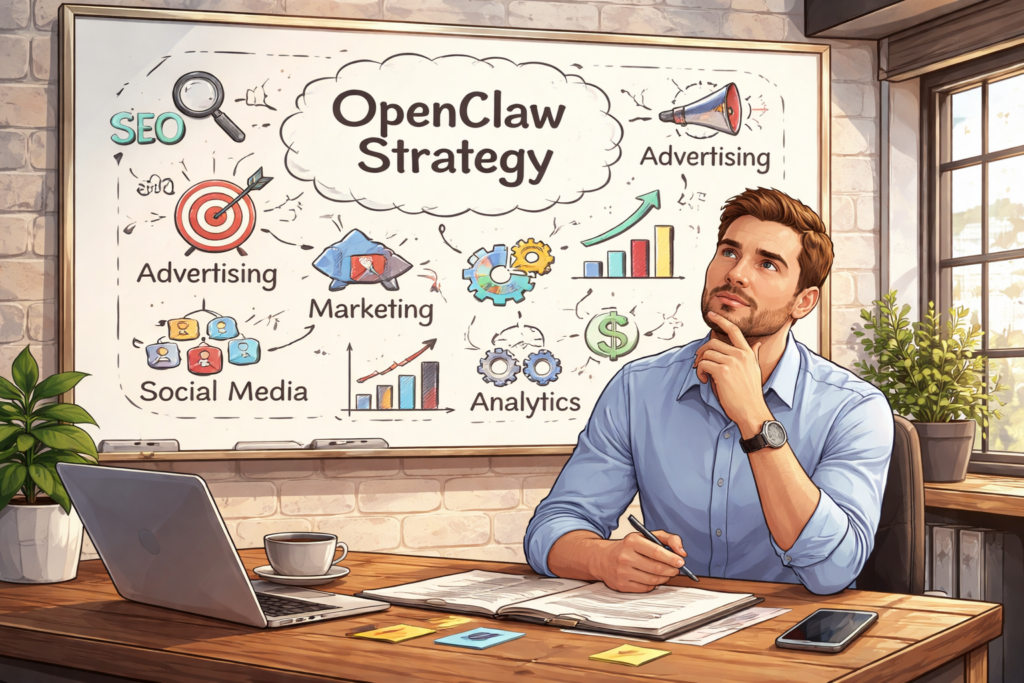
You’re using AI. Your team is using AI. Everyone’s using AI. But here’s the uncomfortable question: Do you have an AI strategy? If you’re like most businesses right now, the honest answer is no. You’ve got ChatGPT subscriptions scattered across departments. A few Zapier workflows cobbled together by that tech-savvy marketing manager. Maybe your CRM added an AI feature you’re sort of using. Perhaps someone in operations discovered Claude and swears by it for writing reports. This is what Thryv and the U.S. Chamber of Commerce are calling “Shadow AI” or “AI Sprawl” in their recent surveys. It’s the business equivalent of having a dozen disconnected apps all trying to solve the same problem in different ways. And while it feels like progress, it’s actually creating a dangerous illusion of improvement. The truth is, there’s a massive difference between using AI tools and having an AI strategy. One is reactive, fragmented, and expensive. The other is systematic, integrated, and genuinely competitive. The question isn’t whether you should adopt AI. You’re already doing that. The real question is: when will you stop accumulating tools and start building infrastructure? The hidden cost of “winging it” Recent surveys from Thryv and the U.S. Chamber of Commerce reveal that 55-68% of small and mid-sized businesses are now using AI in some capacity. That’s remarkable growth in just two years. But dig deeper into those numbers, and you’ll find something troubling: most of these businesses are just experimenting, not executing. They’re paying for multiple subscriptions. ChatGPT Plus, Jasper, Copy.ai, Zapier, maybe a few API credits here and there. Each tool promises to save time. Each integration claims to boost productivity. Yet somehow, teams feel busier than ever, drowning in a sea of disconnected platforms that don’t talk to each other. Here’s what that “winging it” approach actually creates: Data silos everywhere. Your marketing AI doesn’t know what your sales CRM knows. Your customer support tool can’t access your product database. Every system operates in isolation, forcing humans to be the connective tissue, copying, pasting, translating, and manually syncing information between platforms. Security blind spots. When employees adopt tools independently, IT has no visibility into what data is flowing where. Sensitive customer information gets pasted into third-party platforms with unknown data policies. Compliance becomes a nightmare. You can’t protect what you can’t see. Subscription bloat. Five team members each paying for their own ChatGPT Plus account. Three different automation platforms because different departments started with different tools. Duplicate functionality across systems because nobody realized another team already solved that problem. Cognitive overhead. Your team spends mental energy not just on their actual work, but on remembering which tool to use for what, how to format data for each platform, and which workarounds make incompatible systems cooperate. This isn’t progress. It’s chaos with a modern interface. The problem isn’t the individual tools (many are excellent at what they do). The problem is treating AI adoption as a procurement decision rather than an architectural one. You wouldn’t build a house by buying random building materials and hoping they fit together. Why would you build your business’s AI infrastructure that way? Tactical vs. strategic: a real-world comparison Let’s make this concrete. Consider two approaches to the same business problem: handling customer email inquiries. The tactical approach: Your customer service rep gets an email. They copy the message into ChatGPT and ask it to draft a professional response. They review the output, make some edits, then paste it into their email client and send it. Maybe they log the interaction in a spreadsheet. If they’re sophisticated, they’ve got a Zapier workflow that moves certain emails to a specific folder. This saves a few minutes per email. It feels productive. It is, marginally, better than nothing. The strategic approach: An OpenClaw agent monitors the inbox continuously. When an email arrives, it automatically categorizes the intent (support request, sales inquiry, partnership proposal). It pulls relevant context from your CRM: previous interactions, account status, outstanding issues. It cross-references your knowledge base for product-specific details. It drafts a contextually appropriate response that maintains your brand voice and includes accurate information. For routine inquiries, it sends the response autonomously. For complex situations, it flags the message for human review with a summary of the situation and a recommended approach. No copying. No pasting. No context switching. No manual logging. The entire workflow is invisible until human judgment is actually needed. See the difference? One is a productivity hack. The other is infrastructure. The tactical approach makes individual tasks slightly easier. The strategic approach eliminates entire categories of work while simultaneously improving quality, consistency, and response time. This distinction (tactical versus strategic) is the divide in AI adoption right now. Most businesses are stuck in the tactical mindset, asking “What can AI do for me?” when they should be asking “How should AI reshape how we work?” What OpenClaw actually is (and isn’t) Let’s clear up a common misconception: OpenClaw isn’t another chatbot. It’s not a tool you open when you need to write something or analyze data. It’s not competing with ChatGPT or Claude or Gemini. OpenClaw is an orchestration layer. A central nervous system for business automation that connects and coordinates everything else. Think of it this way: Individual AI tools are like having talented specialists who work in separate offices and never communicate. OpenClaw is the organizational structure that lets those specialists collaborate, share context, and work toward common goals. At its core, OpenClaw provides three critical capabilities that scattered tools simply cannot: Workflow automation that actually works. True automation means eliminating human intervention from routine processes, not just making those processes slightly faster. OpenClaw can monitor triggers across multiple systems, make contextual decisions about what to do next, execute complex multi-step workflows, and handle exceptions intelligently, all without someone clicking “Run” each time. Data integration across your entire business. OpenClaw breaks down the silos. It connects your CRM with your email with your calendar with your project management system with your
5 Website Red Flags That Make You Look Like a Spam Site

5 website red flags that make you look like a spam site You’ve invested in marketing. You’re driving traffic to your website. But here’s the problem: visitors arrive, glance at your homepage for three seconds, and vanish. Your bounce rate is through the roof. Here’s the uncomfortable truth: your website might be accidentally triggering the same alarm bells in people’s brains that scam sites do on purpose. Users make snap judgments about website credibility in about 50 milliseconds (faster than you can blink). After years of dodging phishing attempts, malware pop-ups, and too-good-to-be-true offers, people have developed a sixth sense for spotting sketchy websites. If your legitimate business accidentally uses the same tactics that spammers rely on, you’ll lose potential customers before they even read your first headline. The good news? Most of these red flags are fixable. Let’s walk through the five most common mistakes that make visitors think “scam” and show you exactly how to fix them. Red flag #1: The dreaded “not secure” warning When someone visits your website and sees “Not Secure” displayed right next to your URL in their browser, it’s game over before you’ve even started. Modern browsers (especially Google Chrome) actively flag HTTP sites as unsafe. That little warning isn’t subtle. It’s right there in the address bar, screaming “DANGER” to anyone who clicks on your link. Why it screams “spam”: That warning tells users their data isn’t encrypted. Phishing sites, scam operations, and malware distributors rarely bother with SSL certificates because they’re disposable operations. If you don’t have HTTPS, you’re lumped into the same category in visitors’ minds. This is especially devastating if you’re trying to collect information: email addresses, phone numbers, payment details. Would you enter your credit card number on a site labeled “Not Secure”? Neither will your customers. Real-world impact: A local roofing company once saw a 40% drop in lead form submissions overnight. They couldn’t figure out what changed until they realized their SSL certificate had expired. The moment that browser warning appeared, potential customers stopped trusting them with their contact information. Once they renewed the certificate, conversions returned to normal within 48 hours. The quick fix 1. Check if you have SSL. Type your website URL with “https://” at the beginning. If it redirects to “http://” or shows a warning, you have a problem. 2. Get an SSL certificate. Most hosting providers offer free Let’s Encrypt SSL certificates. If you’re with a major host like Bluehost, SiteGround, or GoDaddy, you can usually enable HTTPS with a single click in your control panel. 3. Force HTTPS. Once your certificate is installed, make sure your website automatically redirects visitors to the secure version. This usually requires adding a simple redirect rule to your site’s configuration. If this sounds technical and you’re not sure where to start, contact your web hosting provider. This is a standard request they handle daily, and most can enable HTTPS for you within minutes. Red flag #2: The pop-up ambush You land on a website and immediately get bombarded. A newsletter signup pop-up covers the screen. A live chat widget pings in the corner. A cookie consent banner slides up from the bottom. A notification request appears at the top. All within the first three seconds. It’s overwhelming, aggressive, and the exact opposite of a good first impression. Why it screams “spam”: This behavior mimics malware sites and clickbait farms that are trying to trap you. Legitimate businesses don’t need to trap visitors—they earn their attention. When you throw five interruptions at someone before they’ve even read a single word of your content, you signal desperation. Mobile users get hit especially hard. On a small screen, an aggressive pop-up doesn’t just interrupt—it completely blocks the entire experience. Real-world impact: Studies consistently show that intrusive interstitials (the fancy term for these pop-ups) increase bounce rates significantly. Google even penalizes sites that use aggressive mobile pop-ups in search rankings. You’re literally paying to drive traffic to your site, then immediately annoying those visitors away. The quick fix 1. Delay your pop-ups. If you use newsletter sign-up forms or special offers, set them to appear only after a visitor has scrolled 50% down the page or spent at least 30 seconds on your site. This shows you respect their time and want them to see your content first. 2. Make the exit obvious. When a pop-up does appear, make sure the “X” button to close it is large, clearly visible, and actually works. Nothing frustrates users more than a close button that doesn’t close anything. 3. Limit the interruptions. You don’t need five different tools fighting for attention. Pick one (whether it’s a newsletter form, a chat widget, or a special offer) and present it thoughtfully. 4. Test on mobile. Pull out your phone right now and visit your own website. Can you read the content? Or are you spending your time closing pop-ups and dismissing notifications? If you find it annoying, your customers do too. Bottom line: Let visitors experience your content before you ask them for anything. Build value first, request action second. Red flag #3: The ghost town contact page Your Contact page has a blank form with fields for name, email, and message. That’s it. No phone number. No email address. No physical location. Just a digital suggestion box that goes… somewhere. Why it screams “spam”: Fly-by-night operations hide their identities because they don’t plan to be around long. Scam sites use generic contact forms because they don’t want to be tracked down. Legitimate businesses, on the other hand, make themselves easy to reach. When a potential customer can’t find a way to actually contact you (like, pick up the phone and talk to a human), they start wondering if you’re real. And if they’re wondering that, they’re definitely not buying from you. Real-world impact: This plummets trust, especially for higher-value purchases or services. If I’m considering hiring someone to remodel my kitchen or manage my company’s IT infrastructure, I want to know
Stunning WordPress Redesign for Ship Shape Car Wash

Transform your online presence with our stunning WordPress redesign for Ship Shape Car Wash. Experience custom development that elevates your brand today!